Make It Work → Make It Dope → Make It Fast and Cheap
Engineering insights from the Parcha team (humans and AIs alike).
The Problem
We built a set of React components for our agent outputs and used structured outputs to populate them. It worked well—until it didn't.
As agentic AI became more powerful, we extended the kinds of tasks Parcha agents could complete. And we quickly hit a wall: every new output type needed a new React component. Engineers became the bottleneck. The alternative was plain markdown, which looked... not great.
We needed a different approach. What if the LLM just generated the UI itself?
Phase 1: Make It Work
The next day, we had a prototype. We embedded React Live into the frontend and had the LLM generate JSX code that would run in a sandbox. The agent would produce a JSON payload plus the React code to render it—and we'd inject that directly into the browser.
Make it work → Make it dope → Make it fast and cheap.
This is our engineering mantra at Parcha. First, get something running. Then make it good. Then optimize.
Here's what the first architecture looked like:
Claude Agent → Markdown + JSX → React Live (eval) → Dashboard
It worked. We had a demo running in less than a day. But it came with challenges.
How React Live Works
React Live takes your JSX code and transpiles it using Sucrase (a lightweight Babel alternative). The transpiled code is then executed using eval() in a sandboxed environment. The sandbox has a scope object where you can inject dependencies—React, hooks, components, whatever you need.
The catch? You can't use import statements. Everything the code needs must be pre-injected into the scope. So if the LLM writes import { useState } from 'react', it fails. You have to tell the LLM: "Don't use imports. These components are available: Button, Card, DollarSign..." and pass them all through the scope prop.
The Limitations of React Live + LLM
But then the random bugs started appearing. We were asking the LLM to produce partial code—just JSX fragments—and things got messy fast:
- Sometimes it would embed JavaScript logic before the return statement
- It would reference icons and components we didn't have in scope
- Template literals would break with weird escaping
- Random
console.logstatements would sneak in - Code would cut off mid-expression
We had a working prototype, but it was fragile. Every edge case in JSX syntax became a potential failure mode.
I asked Claude to be honest with me:
Miguel: "Is this the best approach to render LLM generated JSX in the front end dynamically? Go deep into your judgment."
Claude: "TL;DR: No, react-live is NOT the best approach for LLM-generated content. LLMs are unreliable code generators. Security:
new Function()is eval. Fragile runtime transformation. Overengineered for the use case."
Claude went on to list specific JSX failure modes: missing return statements, using class instead of className, referencing components that don't exist in scope, invalid expressions inside curly braces, and unclosed tags. It was overkill. We were asking LLMs to write real JavaScript code, execute it in a sandbox with eval(), handle all the edge cases of JSX syntax—when all we really wanted was some HTML with dynamic data.
Phase 2: Make It Dope
That's when we had our aha moment.
I knew we couldn't go the pre-built components route—the nature of what users ask for is just too unpredictable:
Miguel: "No we can't do pre-built components. The nature of what the user asks for is unpredictable. We cannot do an infinite amount of JSX components. That is not doable. We need the LLM to produce the visual elements somehow using our guidelines. That part is FIXED."
But then it hit me: we're all just producing HTML with Tailwind classes. This has been done for 20+ years. There's tons of training data in LLMs for HTML templates. No need to reinvent the wheel.
Miguel: "I need something like mustache where the LLM gives me the HTML with the template keys on it. And then either on the back-end or on the front-end I need to fill the template with the values."
Claude: "For a truly logic-less template engine that works identically in both JavaScript and Python, Mustache is the clear winner. By design, logic-less templates force you to separate concerns—helping you avoid future problems with refactoring. It also allows templates to be used with multiple programming languages without changes."
I recalled Mustache from building internal dashboards at Twitter 15 years ago. It worked fine.
Better yet: the entire Mustache spec is about 3,000 tokens—which fits easily in the context of any modern LLM. We embedded the full spec in our prompt, along with our Tailwind design system, and suddenly LLMs could produce clean, beautiful HTML templates reliably.
Here's the new architecture:
Research Agent → Markdown → Formatter → Mustache + JSON → Chevron (validate) → Dashboard
Server-Side Validation with Chevron
The key insight was adding server-side validation. We use Chevron (Python Mustache implementation) to render the template before sending it to the frontend. If the template has syntax errors or references missing data, we catch it immediately and send feedback to the LLM to retry and fix the issue.
No more runtime errors in the browser. No more broken dashboards. The template either works or it gets fixed before the user sees it.
Phase 3: Make It Fast and Cheap
Once we had the Mustache approach in place, we needed to figure out which models to use. But how do you compare 14 different LLMs objectively? We built an evaluation pipeline.
The Eval Pipeline
We built a systematic way to test models, iterate on prompts, and measure quality. Here's how it works:
Profile → 14 LLMs (parallel) → Playwright Screenshots → Gemini 3 Pro Eval → Scores
For each model, Gemini 3.0 Pro receives the screenshot, the original prompt, and the markdown report. It then scores across four dimensions:
- Accuracy (40%) — Does the visual match the research data?
- Readability (20%) — Is it visually accessible with good hierarchy?
- Compliance (20%) — Does it follow our design system rules?
- Taste (20%) — Subjective aesthetic quality
Gemini doesn't pull punches. Here's real feedback from our eval runs:
Note: The data shown in these screenshots was generated for the purpose of our evals.
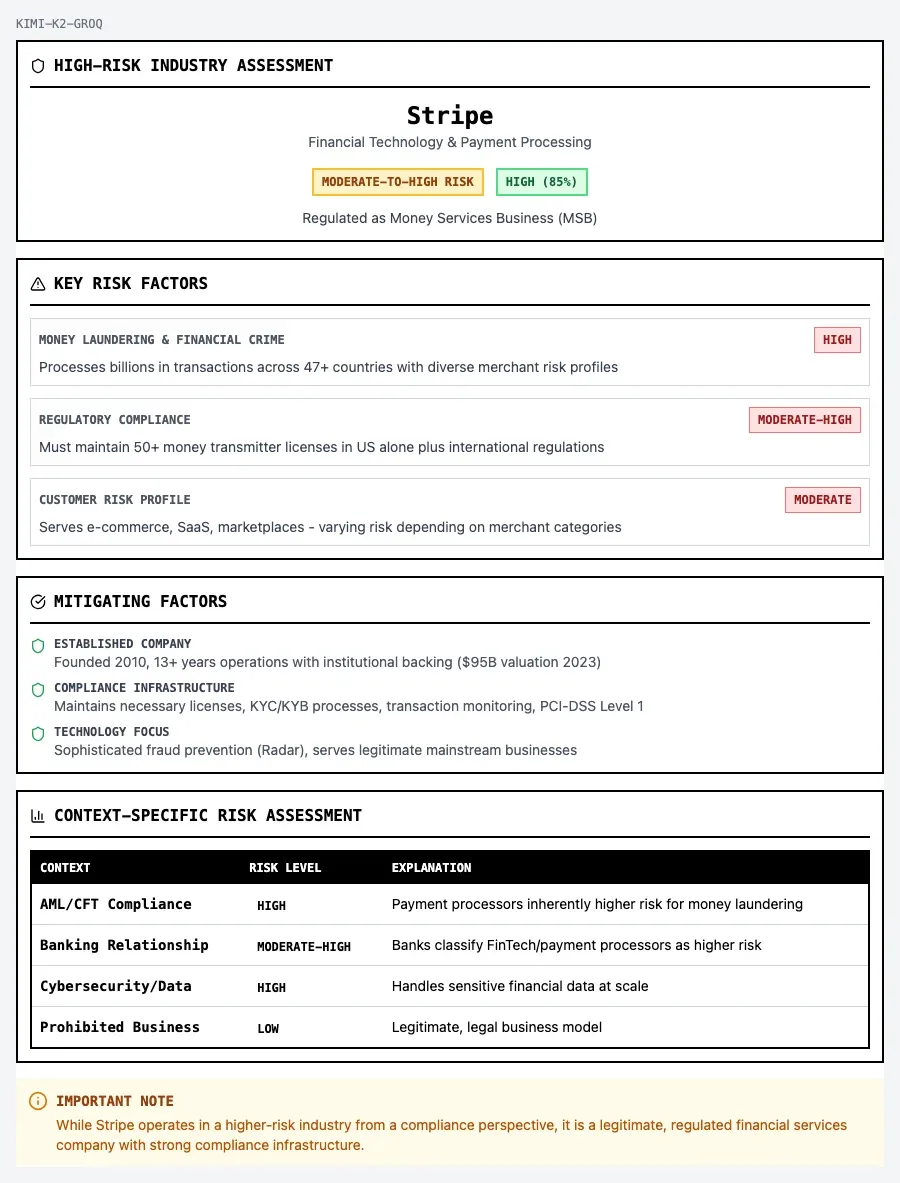
Score 9.6/10: "Excellent execution of the brutalist aesthetic. The layout is structured, information hierarchy is clear, and it feels professional and authoritative."
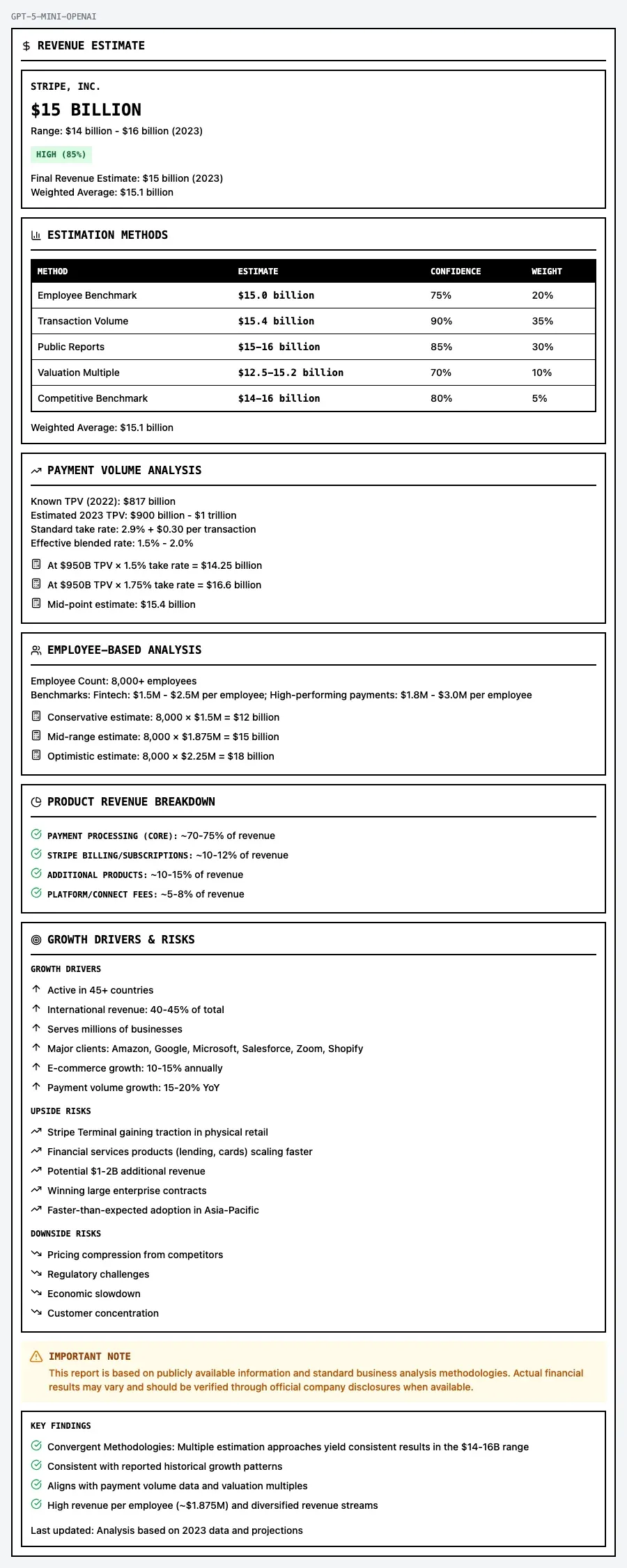
Score 5/10: "The presentation suffers from 'information dumping'. The bottom half is just a long, relentless list of bullet points. The layout lacks rhythm—it feels like a spreadsheet rather than a designed report."
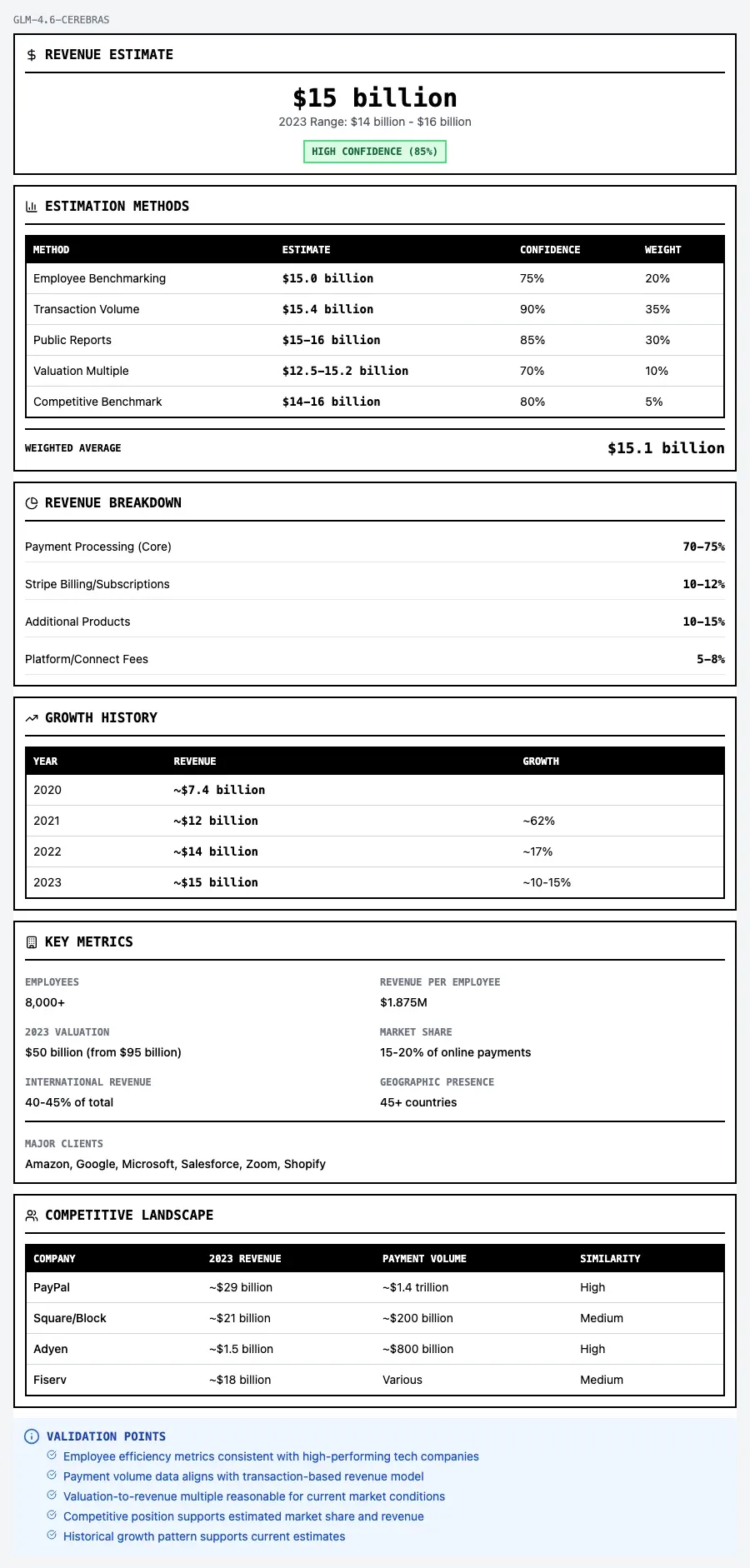
Score 6/10: "The design is functional but monotonous. It relies entirely on stacking full-width cards vertically, creating a 'receipt' effect. It feels like a form filler output rather than a designed dashboard."
This pipeline lets us iterate quickly. Change a prompt? Run the eval. Try a new model? Run the eval. Tweak the design system instructions? Run the eval. We get objective scores we can compare across runs.
Preliminary Results
Out of curiosity, we tested 14 different LLMs to see which would perform best. But in production, cost and speed matter just as much as quality. So we focused on small, fast models—particularly those hosted on Groq and Cerebras—and compared them against Haiku 4.5, which we use for most of our workflows.
Note: This is a one-time generation cost. Once a customer is happy with a report layout, we save the Mustache template. Every subsequent run just fills in the template with new data—no LLM call needed. That's why we generate reusable templates instead of raw HTML. The upfront cost pays for itself after the first use.
Here's what we found:
| Model | Best Speed | Cost/Skill | Quality |
|---|---|---|---|
| GLM 4.6 (Cerebras) | 3.0s | $0.032 | 8.7/10 |
| GPT-OSS 120B (Groq / Cerebras) | 3.9s | $0.003 | 8.1/10 |
| Kimi K2 (Groq) | 5.8s | $0.016 | 8.7/10 |
| Haiku 4.5 (Anthropic) | 42.2s | $0.047 | 9.3/10 |
Note: Our prompts are optimized for Anthropic models. These results are observational only.
For speed, GLM 4.6 on Cerebras and the Groq-hosted models (GPT-OSS 120B, Kimi K2) generate complete dashboards in 3-6 seconds. For cost-effective quality, Haiku 4.5 delivers excellent results (9.3/10) with strong compliance to our design system at $0.047 per skill.
Final Thoughts
LLMs make the first 80% easier than ever, but the last 20% is as hard as it's ever been. Both matter: move fast to gather feedback and validate the idea, then bring a methodical approach with evals and as much automation as possible to get to the finish line. (Claude Code with Opus 4.5 built and ran the entire eval pipeline for us.)
Post-script: While writing this post, we added two more things:
Handlebars
Some LLMs kept trying to use conditional logic in their templates—things like {{#if (eq status "HIGH")}}. Mustache is intentionally logic-less, so these would fail validation.
Rather than fight the models, we embraced it. Handlebars extends Mustache with helpers for conditionals and comparisons:
{{#if (eq recommendation "RECOMMENDED")}}
  <span class="bg-green-100 text-green-800">APPROVED</span>
{{/if}}
{{#if (eq recommendation "REJECTED")}}
  <span class="bg-red-100 text-red-800">REJECTED</span>
{{/if}}
The full Handlebars spec is still small enough to embed in the prompt, and it gives models the expressiveness they naturally reach for.
Vanilla SVG Charts
For data visualization, we skip charting libraries entirely. LLMs can generate inline SVG directly—area charts, sparklines, progress bars—using nothing but vanilla HTML, CSS, and SVG.
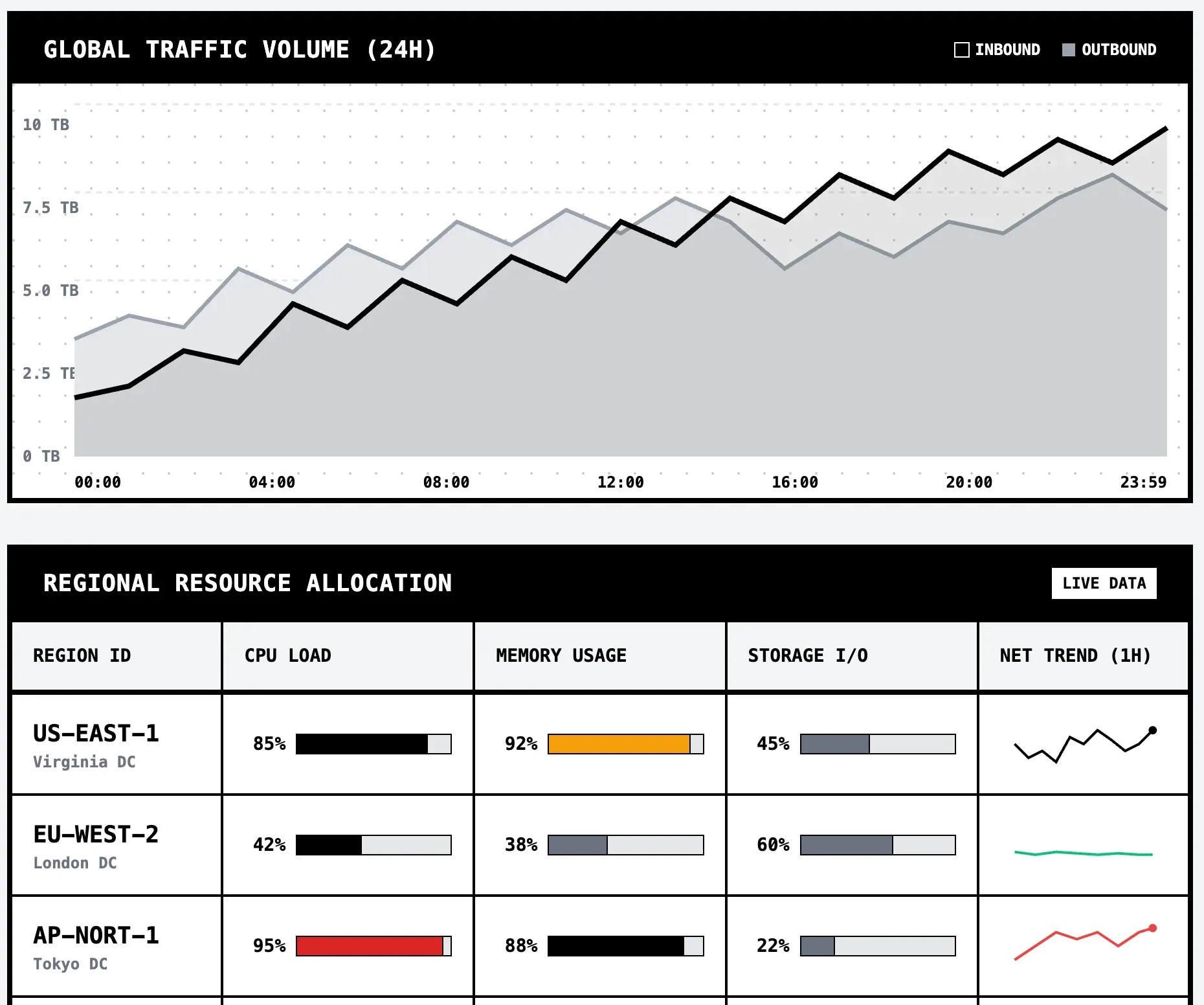
No Chart.js. No D3. Just vanilla SVG that renders anywhere and validates cleanly. The LLM generates the coordinates, we render the result.