Build agents
Create a Grep agent
Eight steps: the decision, then the builder's seven.
Step 1
Pick the right first agent
One narrow workflow a person already does the same way every time.
Start where a repeatable process already exists. An agent is worth building when a person follows the same steps, reads the same kinds of sources, and reaches a decision someone else acts on.
- There is a clear decision or recommendation to make.
- The source material — policies, examples, rubrics — already exists.
- The inputs can be collected the same way every run.
- The output is usable by a reviewer, a downstream system, or the API.
- You have enough completed examples to tell whether the agent is right.
Step 2
Step 1 — Context
Name, icon, instructions, and the files every run should read.
BUILD AN AGENT opens a seven-step builder: CONTEXT, SKILLS & TOOLS, INPUT, OUTPUT, EVALS, SETTINGS, SHARING. The rail runs down the left and you can move between steps freely.
Try it in Grep: Show me where to build an agent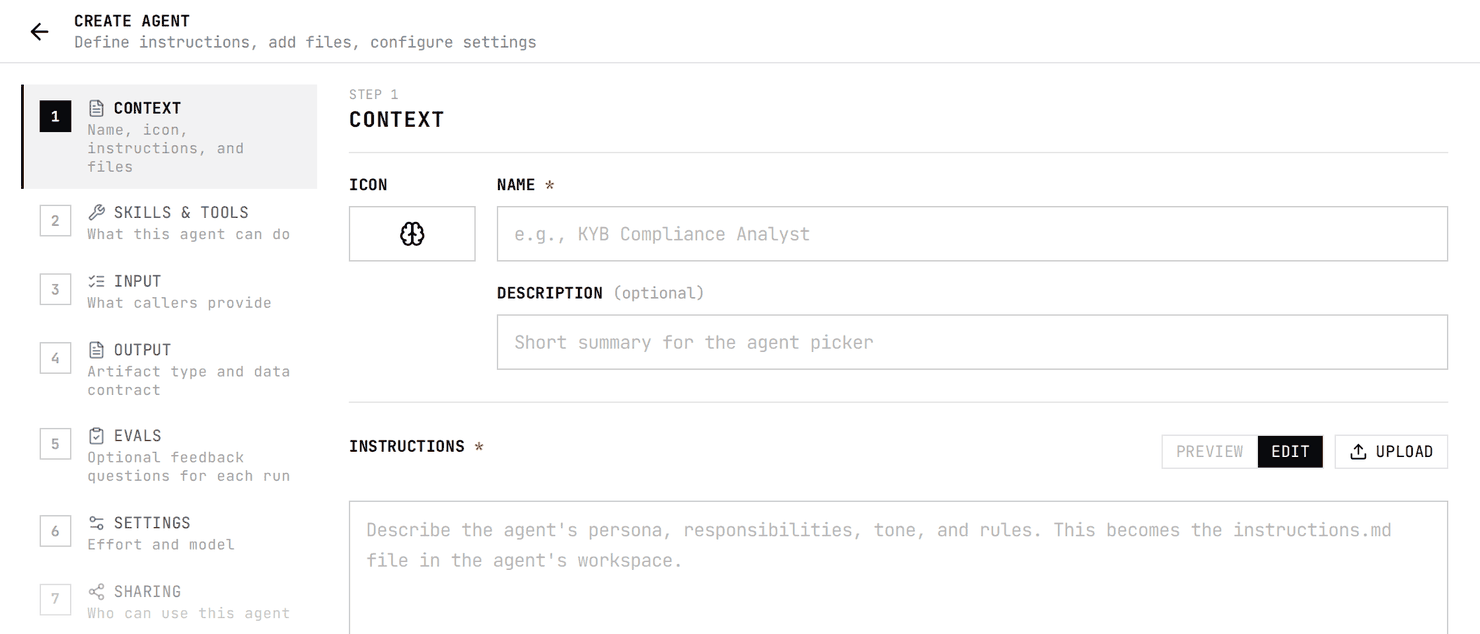
Step 1 takes an ICON, a NAME (required), an optional DESCRIPTION, and INSTRUCTIONS (required). The instructions box has PREVIEW, EDIT and UPLOAD, and a counter that says the text is saved as instructions.md. Below it, CONTEXT FILES takes PDFs, Office documents (docx, pptx, xlsx, rtf), images, or text files.
- Say what job the agent does, who the output is for, and what decision it should reach.
- Give the workflow steps, not just the goal.
- Name the context files in the instructions and say how to use each one — uploading a policy does not make the agent apply it.
- Say what to do when evidence is missing, conflicting, or weak, and when to escalate to a person.
- Describe the output structure you expect.
| Put in Context | Why |
|---|---|
| Policies and standard procedures | The same rules must apply every run. |
| Reference tables — code mappings, risk categories | Shared knowledge, not run-specific data. |
| Rubrics, scoring and escalation rules | They define how judgement is applied. |
| Good and bad completed examples | They show what finished work looks like. |
Checked against the product on October 15, 2026
Step 3
Step 2 — Skills and tools
One skill per step a person would perform.
Step 2 opens on a catalogue of more than 300 skills, filtered by ALL, RESEARCH, OTHER, BUSINESS, PERSON and UI, with a count against each. CREATE CUSTOM SKILL sits at the top for anything the catalogue does not cover, and the header tracks how many you have selected.
Below the skills, TOOLS lists the tools you can add to the agent directly, filtered by category, with its own count of how many you have selected.
Under YOUR CONNECTIONS, each connection with more than one tool is one row: the connection's name, a TEAM label if it is a team connection, and a count such as "0 of 4 tools selected". The arrow opens the row to list its tools. Tick one tool to add only that tool, or tick the row's own checkbox to select all of that connection's tools; tick it again to clear them. A row with only some of its tools selected shows a minus in its checkbox, and a row with any tool selected moves to SELECTED. A connection with only one tool is listed as that tool.
Skills are reusable instructions for a sub-task. Tools are external capabilities the agent can call — search, website reading, enrichment, screening. Map each step a person performs to one skill.
Checked against the product on October 24, 2026
Step 4
Step 3 — Input
The fields that change from run to run.
Step 3 is the INPUT FORM: "Define the fields users see when chatting with this agent. Each field becomes an input on the chat surface." A new agent starts with no fields; ADD FIELD builds the intake form, which is saved as form.json in the agent's workspace.
| Input | Context |
|---|---|
| Company or person name | The reference table |
| Website or domain | The risk policy |
| The case's own documents | The standard questionnaire template |
Checked against the product on October 15, 2026
Step 5
Step 4 — Output
The artifact, and the data contract under it.
Step 4 sets OUTPUT TYPE, the artifact the agent produces every run. New agents start on Research report; the menu also offers Decision, Task summary, Dashboard, Slidedeck, Document, Spreadsheet, PDF, Website, Data Explorer, Podcast and Video. DEFAULT OUTPUT SCHEMA is the optional JSON Schema the API uses for structured output. Types that accept an example file, such as Document, also show an OUTPUT TEMPLATE box.
How to choose an output typeChecked against the product on October 15, 2026
Step 6
Step 5 — Evals
Optional questions a reviewer answers about each run.
Step 5 is EVAL QUESTIONS: "Define optional questions reviewers can answer about each job this agent runs. This step is optional." A new agent has none; ADD QUESTION builds the per-job evaluation form.
Checked against the product on October 15, 2026
Step 7
Step 6 — Settings
Harness, default effort, default model — then CREATE.
HARNESS chooses the runtime: Claude Agents, the Claude Code harness, or Grep Agents, the agentrun self-improving harness. Both are US-hosted.
| Default effort | What the builder says |
|---|---|
| Low | Quick pass, minimum tool calls |
| Medium | Balanced depth and breadth |
| High | Maximum exploration and analysis |
DEFAULT MODEL lists models with a relative credit cost from $ to $$$$. New agents use Opus 5. Take the lowest settings that still meet your evidence standard, and raise them when the agent needs deeper reasoning — not because the prompt got longer.
Checked against the product on October 15, 2026
Step 8
Step 7 — Sharing, after testing
Test on known cases first, then choose who gets it.
Step 7 opens with the agent's ID, an example API call and the agent's owner, then sets who else may run it. On a team, only the team's admins see this step; Builders and Members do not, even for agents they own. People you share with can run the agent but cannot edit or share it. DONE closes the builder.
| Option | Who can run the agent |
|---|---|
| SHARE WITH TEAM: "Everyone on <team name>" | Every member of the team. |
| SHARE WITH TEAM MEMBERS | Only the teammates you pick from the team's members. |
| PUBLIC ACCESS: "Anyone on Grep can use this agent" | Anyone who signs in to Grep. Only Parcha admins can turn it on. |
Publishing to everyone is limited to Parcha admins: everyone else sees a note saying so where the PUBLIC ACCESS checkbox would be, and the server refuses the change. An active public agent gets a link anyone can open; they sign in to run it. While PUBLIC ACCESS is on, the team and member shares are kept but inactive. Sharing with a whole email domain or another organisation is also for Parcha admins only. Without a team, the tab says team-wide sharing needs an active team, and only a Parcha admin can share the agent.
- Do not share an agent after one happy-path run.
- Do not leave a production agent without a named owner.
- Do not change instructions, context, skills or schema without re-running your examples.
Build a set of 10 to 20 test cases first: easy ones, ambiguous ones that should escalate, cases with incomplete or conflicting evidence, and at least one where the right answer is "I do not know". Score correctness, evidence quality, escalation behaviour and schema validity.
| Problem | Fix |
|---|---|
| The agent ignores a policy file. | Name the file in the instructions and say exactly how to use it. |
| The output shape keeps changing. | Tighten the JSON schema, mark required fields, add one valid example. |
| Manual runs are inconsistent. | Replace free-form instructions with structured input fields. |
Checked against the product on October 27, 2026