Get started
Find your work
Chats, the Recent shelf, Search everything and Job History: where a task you ran yesterday went.
Step 1
Recent chats
Every task is a chat, and the newest sit in the sidebar.
Every task you start is a chat, and the sidebar lists them under RECENT, newest first. The one you used last is marked CONTINUE WHERE YOU LEFT OFF. A task still working shows RUNNING.
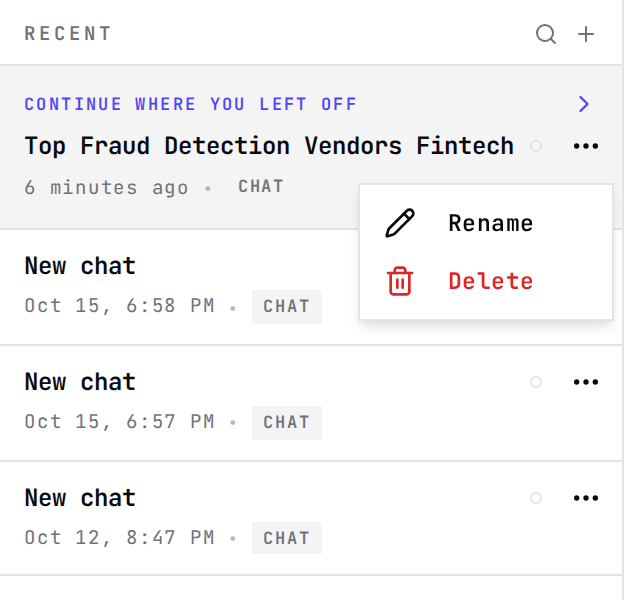
- Rename a chat to something you will recognise later. Grep names it from the first question.
- Delete removes the transcript from your history. What Grep learned from it stays in its memory.
- The + beside RECENT starts a new task.
Checked against the product on October 15, 2026
Step 2
Search everything
One box for jobs, agents, loops, files and pages.
Search everything, at the top of the sidebar, opens a command palette (⌘K, or Ctrl+K). Type part of a name and it lists matching jobs, agents, loops, files and pages; the arrow keys move and Enter opens.
Try it in Grep: Show me Search everythingChecked against the product on October 15, 2026
Step 3
Job History
Every research job you have run, as a table.
Job History, in the sidebar, lists every research job as a row: its ID, the agent that ran it, the type, the report, the input it was given and the date. Clicking a row opens the job.

- All agents narrows the table to one agent's jobs.
- Every column sorts and filters, and the columns can be dragged into a different order.
- The input cell opens to show everything the job was given, with Copy JSON.
Checked against the product on October 15, 2026
Step 4
Export it
The table as a CSV.
Export downloads job-history.csv: every job that matches your search, type and agent choice, up to 10,000 rows.
Try it in Grep: Show me ExportChecked against the product on October 15, 2026