Get started
Run your first research task
From an empty composer to a cited answer, start to finish.
Step 1
Before you start
Know what a task costs before you run one.
A task spends credits. Your balance shows at the top right of the start page, and Add more credits at the bottom of the sidebar is where you top it up (accounts still on a subscription plan see Upgrade there instead). Settings, then Billing, is where the spending shows up: research job costs land under ACTIVITY, and once you have paid for something an INVOICES section lists those charges too.
Checked against the product on October 15, 2026
Step 2
Write the question
Name the subject, the output, and the limits.
The start page asks "What's next?" above a single box. Grep works best when the question says what to look at, what to hand back, and what to leave out.

- Compare the top five vendors for fraud detection in fintech, with pricing and customer examples.
- Research recent regulatory updates affecting stablecoin issuers in the United States.
- Create a market map for AI voice agents serving healthcare providers.
- Tell me about AI.
- Research competitors.
- Find everything about this company.
Checked against the product on October 28, 2026
Step 3
Pick an effort level
How long Grep works, and how hard.
Effort is the dial under the composer. It sets how long Grep spends and how much checking it does. Higher effort takes longer and costs more.
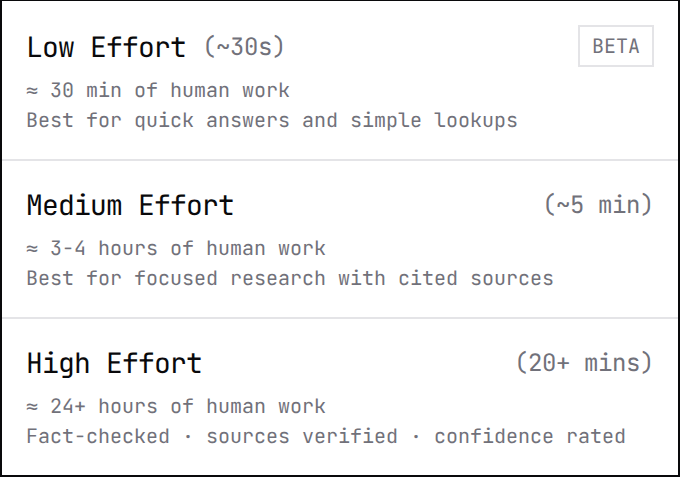
| Level | Takes | Best for |
|---|---|---|
| Low Effort | ~30 sec | Quick answers and simple lookups. Stands in for about 30 minutes of human work. |
| Medium Effort | ~5 min | Focused research with cited sources. Stands in for about 3–4 hours of human work. |
| High Effort | 20+ min | Fact-checked, sources verified, confidence rated. Stands in for 24+ hours of human work. |
Checked against the product on October 15, 2026
Step 4
Run it
Start the task and walk away.
Press RUN. The task opens as a chat: Grep says what it is about to do, shows RUNNING with a timer while it searches and reads sources, and posts a card for the finished report.
You do not have to wait on the page. The task keeps running if you navigate away. It stays under RECENT in the sidebar, and the finished job is listed in Job History.
Checked against the product on October 15, 2026
Step 5
Read the answer
Check the claims before you send it on.
When the task finishes, the chat gives a short summary of what the report found — including what it could not find — and a report card showing the effort level, the number of sources and DONE with the time it took. OPEN on the card puts the report beside the chat.
The report's SOURCES tab carries the count, like SOURCES · 18. Open it and check anything load-bearing before the answer leaves your hands.
Checked against the product on October 15, 2026
Step 6
Ask a follow-up
Refine the result instead of starting over.
Ask a follow-up in the same chat. It continues the task you already ran, so Grep reopens what it found rather than researching from scratch.
- Turn this into a table with pricing, target customer, and proof points.
- Go deeper on companies founded after 2022.
- Summarize only the risks and open questions.
Checked against the product on October 15, 2026