Get started
Recurring and watched research (Loops and Monitors)
Run the same research on a schedule, or be told when something changes.
Step 1
Two ways to not run it yourself
A loop runs on the clock. A monitor runs when the web moves.
LOOPS AND MONITORS in the left sidebar holds research that runs without you. An empty account says so, "No loops or monitors yet", and offers CREATE YOUR FIRST LOOP OR MONITOR. NEW does the same thing once you have some.
Both open CREATE LOOP, a page with three steps: SETUP, INPUTS and DELIVERY. LOOP TYPE on the first step is the choice that shapes the rest.
Try it in Grep: Show me where Loops live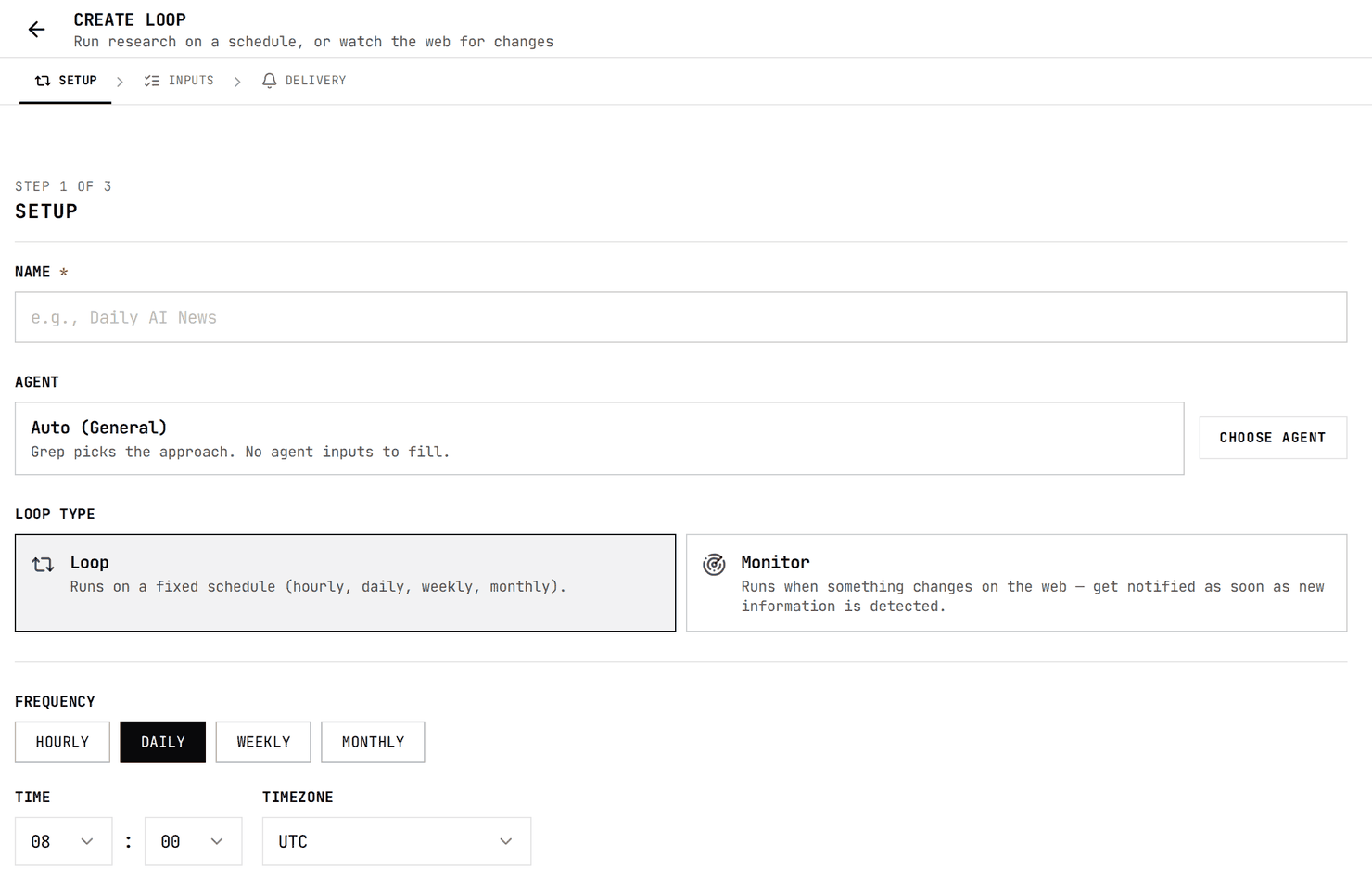
| Loop type | What it does |
|---|---|
| Loop | Runs on a fixed schedule: hourly, daily, weekly or monthly. |
| Monitor | Runs when something changes on the web, and tells you as soon as new information is detected. |
Checked against the product on October 15, 2026
Step 2
Name it, pick an agent, set the clock
Setup is who runs it and when.
NAME is what you will see in the list; the field suggests something like "Daily AI News". AGENT starts on Auto (General), where Grep picks the approach and there are no agent inputs to fill. CHOOSE AGENT swaps in one of your agents instead.
| Frequency | What else it asks for |
|---|---|
| Hourly | MINUTE PAST THE HOUR and TIMEZONE |
| Daily | TIME and TIMEZONE |
| Weekly | DAY OF WEEK, TIME and TIMEZONE |
| Monthly | DAY OF MONTH, TIME and TIMEZONE |
A monitor has no clock. It has CHECK FREQUENCY, Daily, Weekly or Monthly, which is how often it scans the web for new information matching your query.
Checked against the product on October 15, 2026
Step 3
Write a question that ages well
It will run again next week. Do not hard-code this week.
The INPUTS step opens on the question. For a loop the box is labelled WHAT DO YOU WANT THE LOOP TO DO?, and for a monitor WHAT TO WATCH FOR.
A recurring question has a problem a one-off does not: dates go stale. The field takes placeholders that are filled in at run time.
| Placeholder | Becomes |
|---|---|
| {{today}} | The day the run happens |
| {{this_week}} | The week the run happens |
| {{last_7_days}} | The seven days before the run |
Checked against the product on October 15, 2026
Step 4
Effort, and files it should read every time
A watchlist belongs here, not in the question.
EFFORT LEVEL uses the same three levels as the composer: Low (about 30 seconds), Medium (2 to 3 minutes) and High (5 minutes or more). The composer quotes longer times for Medium and High, but they are the same settings.
INPUT FILES takes Files or a Folder, described in the form as "Optional reference files (e.g. a watchlist). Available to the agent on every run." Anything the run should always consult goes here rather than being pasted into the question.
- A watchlist of companies, people or domains to check each time.
- The policy or rubric the result should be judged against.
- A list of sources to prefer.
Checked against the product on October 15, 2026
Step 5
Where the results go
Email is on unless you turn it off.
DELIVERY is the last step. For a loop, "Send an email when this loop runs" is ticked from the start. SEND TO takes more addresses; leave it empty and the email goes to the address on your account.
A monitor always emails the address on your account, each time it runs and finds something.
CREATE LOOP finishes either kind.
Checked against the product on October 15, 2026
Step 6
What a loop costs
Every run is a run.
Each run bills like any other task at its effort level: credits are reserved when it starts, then settled against what it actually used. Nothing about a loop is cheaper than running it yourself.
What each effort level reservesHow a reservation is settledChecked against the product on October 15, 2026